AllowDoubleKeyShortcuts Property
Description
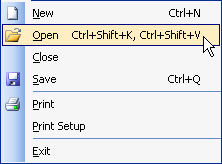
Enables or disables the use of double key shortcuts (i.e., Ctrl+O, Ctrl+P).
Property Type
Read-write property
Syntax (Visual Basic)
Public Property AllowDoubleKeyShortcuts() As Boolean
Remarks
The format for the Shortcut string must not include any spaces if used in combination with a key like "Ctrl". A comma (,) must be placed between shortcuts. Reference the code sample below for the correct formatting.
Example
Set KeyBindings = CommandBars.KeyBindings

KeyBindings.AddShortcut ID_FILE_NEW, "Ctrl+N"
KeyBindings.AddShortcut ID_FILE_OPEN, "Ctrl+O"
KeyBindings.AddShortcut ID_FILE_SAVE, "Ctrl+S"
KeyBindings.AddShortcut ID_EDIT_CUT, "Ctrl+X"
KeyBindings.AddShortcut ID_EDIT_COPY, "Ctrl+C"

KeyBindings.AllowDoubleKeyShortcuts = True

' Example of a double shortcut key
KeyBindings.AddShortcut ID_EDIT_PASTE, "Ctrl+V, Ctrl+P"
KeyBindings.AddShortcut ID_FILE_OPEN, "Ctrl+K, Ctrl+Page Up"
See Also
Copyright (c) 1998-2024 Codejock Technologies. All rights reserved.