XTPVisualTheme Enumeration
Description
Specifies the visual themes which are used to display command bars.
Members
| Member | Description |
|---|---|
| xtpThemeOffice2000 | Specifies the Office 2000 visual theme. |
| xtpThemeOfficeXP | Specifies the Office XP visual theme. |
| xtpThemeOffice2003 | Specifies the Office 2003 visual theme. |
| xtpThemeNativeWinXP | Specifies the Windows XP visual style. |
| xtpThemeWhidbey | Specifies the Visual Studio 2005 "Whidbey" visual style. |
| xtpThemeResource | This setting is used when loading a theme from a resource. The CommandBars will use a theme from a resource file, e.g., Office 2007, Office 2007/2010 Ribbon, Office 2010, and Windows 7 appearances. |
| xtpThemeRibbon | Specifies the Ribbon visual theme. Note that this is very similar to the xtpThemeResource theme, with only small differences that can be seen when a button is highlighted and the menu text color is different. There is just more graphics with this theme to give a "glass" look on mouse over. 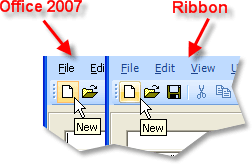 |
| xtpThemeVisualStudio2008 | Specifies the Visual Studio 2008 visual style. |
| xtpThemeVisualStudio6 | Specifies the Visual Studio 6 visual style. |
| xtpThemeVisualStudio2010 | Specifies the Visual Studio 2010 visual style. |
| xtpThemeOffice2007System | Office 2007 System theme. |
| xtpThemeOffice2013 | Specifies the Office 2013 visual style. |
| xtpThemeOffice2016 | Office 2016 theme. |
| xtpThemeVisualStudio2012 | Specifies the Visual Studio 2012 visual style. To be used with a resource file only. It's recommended to use this theme with resource files. |
| xtpThemeVisualStudio2012Light | Specifies the Visual Studio 2012 Light visual style. |
| xtpThemeVisualStudio2012Dark | Specifies the Visual Studio 2012 Dark visual style. |
| xtpThemeVisualStudio2015 | Visual Studio 2015 theme. |
| xtpThemeNativeWindows10 | Windows 10 theme. |
| xtpThemeVisualStudio2017 | Visual Studio 2017 theme. |
| xtpThemeVisualStudio2019 | Visual Studio 2019 theme. |
| xtpThemeVisualStudio2022 | Visual Studio 2022 theme. |
See Also
Copyright (c) 1998-2024 Codejock Technologies. All rights reserved.