XTPControlType Enumeration
Description
Specifies the type of a command bar control.
Members
| Member | Description |
|---|---|
| xtpControlError | Used with the Find method. Used to specify "any" control type. |
| xtpControlButton | Specifies the button control style. This is a normal command bar button that is used in the menu bar and toolbars. |
| xtpControlPopup | Specifies the popup control style. This will add a control that displays a caption with no image. When clicked, a popup menu will display any added controls. |
| xtpControlButtonPopup | Specifies the button popup control style. This will add a control that displays an image with no caption. When clicked, a popup menu will display any added controls. The caption can be shown by setting the control Style property using an XTPButtonStyle flag. |
| xtpControlSplitButtonPopup | Specifies the split button popup control style. |
| xtpControlComboBox | Specifies the combobox control style. This will add a combobox control to your command bar. |
| xtpControlEdit | Specifies the edit control style. This will add an edit box control to your command bar. |
| xtpControlCustom | Specifies the custom control style. This allows you to add any control you want to your command bar. For example, you can add a progress bar or slider control to your command bar. |
| xtpControlLabel | Specifies the Label control style. This will add a control that is used for informational purposes only. This command will not respond to the mouse and cannot receive focus. The background will be displayed in a different color. You can use this to display helpful information about your popup menu. |
| xtpControlCheckBox | Specifies the CheckBox control style. When using this style, the control's checked property is used to determine whether the checkbox is checked or unchecked. 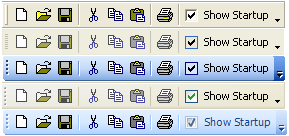 |
| xtpControlGallery | Specifies the Gallery control style. Galleries can be placed in normal toolbars, popup menus, and ribbon groups. 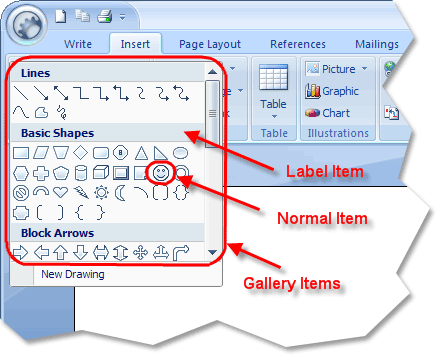 |
| xtpControlRadioButton | Specifies the Radio/Option button control style. This will add a Radio/Option button control to your command bar. |
Copyright (c) 1998-2024 Codejock Technologies. All rights reserved.