DoubleGripper Property
Description
The DoubleGripper property is used to specify whether menu items that are "checked" will have both a check mark and an image next to them in the popup menu.
Property Type
Read-write property
Syntax (Visual Basic)
Public Property DoubleGripper() As Boolean
Remarks
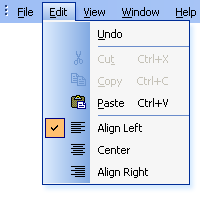
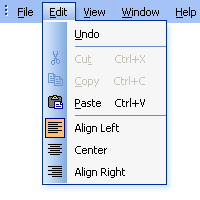
The DoubleGripper property is used to specify whether menu items that are "checked" will have both a check mark and an image next to them in the popup menu. By default, if a menu item has an image and is "checked", then the image of the item will appear highlighted to indicate that it is checked. When using the Double Gripper, both a check mark and the image are displayed side-by-side.
Popup Menu using a Double Gripper
Notice when a menu item is checked, both a check mark and the image are drawn.
Normal Popup Menu
Notice when a menu item is checked, the image of the item becomes highlighted to indicate the item is checked.
Example
This sample illustrates how to use the DoubleGripper property to include both a check mark and an image in a popup menu.
Dim Control As CommandBarControl
Dim ControlEdit As CommandBarPopup

Set ControlEdit = CommandBars.ActiveMenuBar.Controls.Add(xtpControlPopup, 0, "&Edit", -1, False)
ControlEdit.CommandBar.DoubleGripper = True

With ControlEdit.CommandBar.Controls
    .Add xtpControlButton, ID_EDIT_UNDO, "&Undo", -1, False
    Set Control = .Add(xtpControlButton, ID_EDIT_CUT, "Cu&t", -1, False)
    Control.BeginGroup = True
    .Add xtpControlButton, ID_EDIT_COPY, "&Copy", -1, False
    .Add xtpControlButton, ID_EDIT_PASTE, "&Paste", -1, False

    Set Control = .Add(xtpControlButton, ID_FORMAT_ALIGNLEFT, "Align Left", -1, False)
    Control.BeginGroup = True
    .Add xtpControlButton, ID_FORMAT_CENTER, "Center", -1, False
    .Add xtpControlButton, ID_FORMAT_ALIGNRIGHT, "Align Right", -1, False
End With
See Also
Copyright (c) 1998-2024 Codejock Technologies. All rights reserved.