AddCustomBar Method
Description
Allows custom commandbars created with the CreateCommandBar method to be added to the commandbars.
Syntax
Public Sub AddCustomBar( _
    ByVal CommandBar As [CommandBar](XtremeCommandBars~CommandBar.md), _
    ByVal Name As String, _
    ByVal Position As [XTPBarPosition](XtremeCommandBars~Enumerations~XTPBarPosition_EN.md) _
)
Parameters
- CommandBar: Reference to the commandbar to add.
- Name: Text name of the commandbar, will also be used as the title for floating bars.
- Position: Position to place commandbar.
Position Values
| Value | Description |
|---|---|
| xtpBarTop | The bar is docked to the top edge of the form. |
| xtpBarBottom | The bar is docked to the bottom edge of the form. |
| xtpBarLeft | The bar is docked to the left edge of the form. |
| xtpBarRight | The bar is docked to the right edge of the form. |
| xtpBarFloating | The bar is a floating command bar. |
| xtpBarPopup | Not Used for dialog bar. |
| xtpBarListBox | Not Used for dialog bar. |
| xtpBarComboBoxGalleryPopup | The commandbar will be displayed as a gallery. |
Remarks
AddCustomBar allows custom commandbars created with the CreateCommandBar method to be added to the commandbars.
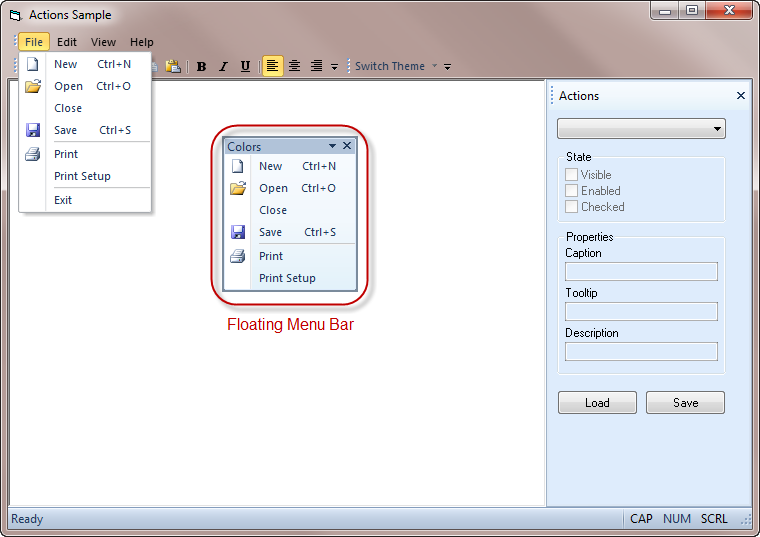
In the code below, CreateCommandBar uses the CXTPFloatingPopupBar class to create a floating popup toolbar that looks exactly like an expanded menu, i.e., the File menu when expanded.
Dim FileMenuBar As CommandBar
Set FileMenuBar = CommandBars.CreateCommandBar("CXTPFloatingPopupBar")
CommandBars.AddCustomBar FileMenuBar, "File Menu", xtpBarFloating

With FileMenuBar
    AddButton .Controls, xtpControlButton, ID_FILE_NEW
    AddButton .Controls, xtpControlButton, ID_FILE_OPEN
    AddButton .Controls, xtpControlButton, ID_FILE_CLOSE
    AddButton .Controls, xtpControlButton, ID_FILE_SAVE
    AddButton .Controls, xtpControlButton, ID_FILE_PRINT, True
    AddButton .Controls, xtpControlButton, ID_FILE_PRINT_SETUP
    AddButton .Controls, xtpControlButton, ID_FILE_EXIT, True
End With
Below is a custom CXTPFloatingPopupBar toolbar.
See Also
Copyright (c) 1998-2024 Codejock Technologies. All rights reserved.