CommandBarPopupColor Object
Description
Represents a color picker control.
For a list of all members defined in this module, see CommandBarPopupColor members.
Object Model










Remarks
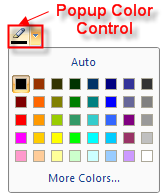
The CreateCommandBarControl method must be used to create a CommandBarPopupColor object.
Example
CXTPControlPopupColor Sample (Visual Basic)
This sample illustrates how to create and use a CXTPControlPopupColor object.
Dim ControlPopupColor As CommandBarPopupColor

Set ControlPopupColor = CommandBars.CreateCommandBarControl("CXTPControlPopupColor")

ControlPopupColor.Id = ID_TEXT_HIGHLIGHTCOLOR
ControlPopupColor.ToolTipText = "Highlight Color"
ControlPopupColor.Style = xtpButtonIcon

GroupFont.AddControl ControlPopupColor

Dim PopupColor As CommandBar
Set PopupColor = CommandBars.Add("Color Popup", xtpBarPopup)
PopupColor.SetPopupToolBar True
Set ControlPopupColor.CommandBar = PopupColor

Set Control = PopupColor.Controls.Add(xtpControlButton, 0, "Auto")
Control.Width = 148

Dim ControlColorSelector As CommandBarControlColorSelector
Set ControlColorSelector = CommandBars.CreateCommandBarControl("CXTPControlColorSelector")
ControlColorSelector.Id = ID_TEXT_HIGHLIGHTCOLOR

PopupColor.Controls.AddControl ControlColorSelector

Set Control = PopupColor.Controls.Add(xtpControlButton, 0, "More Colors...")
Control.Width = 148
See Also
Copyright (c) 1998-2024 Codejock Technologies. All rights reserved.