CommandBar Property
Description
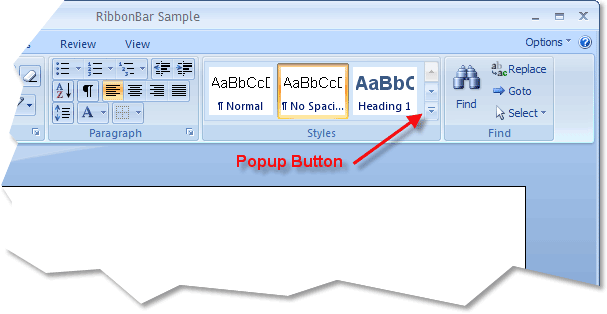
Used to add a popup toolbar to the gallery. This will also add a popup button to the bottom of the scroll bar that the user can click to display the popup.
Property Type
Read-write property
Syntax (Visual Basic)
Public Property CommandBar() As [CommandBar](XtremeCommandBars~CommandBar.md)
Remarks
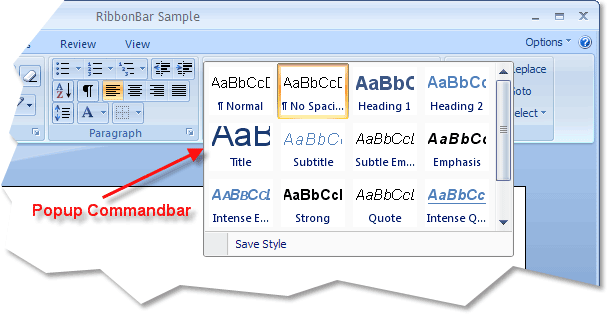
Galleries can also have a popup toolbar to display additional items. When an item is added to the CommandBar, a popup button will automatically appear at the bottom of the scroll bar of the gallery. When the user clicks on the button, the popup toolbar is displayed. A popup toolbar is commonly used to contain another CommandBarGallery object that contains the same items displayed in the parent gallery, only allowing more of the gallery to be displayed.
Note: If you have hidden the scroll bars, the popup button will not be displayed. In this case, the user can press the Alt key, then navigate to the gallery with the keyboard. Once the gallery of items has been scrolled all the way to the bottom using the down arrow key, the popup for the gallery will be displayed.
Note: The only valid type of command bar that can be used with a gallery is of type xtpBarPopup.
The picture below shows the popup button that is added to the gallery when an item is added to the gallery's CommandBar.
The picture below shows the popup command bar after the gallery popup button was clicked. The popup command bar in the picture below has a gallery and commandbarbutton control added. The gallery in the popup is using the same item set as the parent gallery.
See Also
Copyright (c) 1998-2024 Codejock Technologies. All rights reserved.