EditHint Property
Description
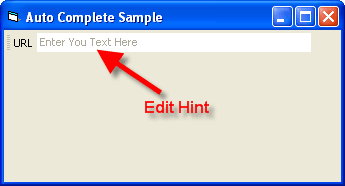
Gets/sets the grayed-out text displayed in the edit control that provides a helpful description of what the control is used for.
Property Type
Read-write property
Syntax (Visual Basic)
Public Property EditHint() As String
Remarks
The edit hint is displayed in the edit window until the drop-down button is pressed, or the user clicks inside the edit control.
Example
EditHint Sample (Visual Basic)
This sample illustrates how to use the EditHint property with the edit control.
Private Sub Form_Load()
    Dim Control As CommandBarEdit
    Set Control = CommandBars.ActiveMenuBar.Controls.Add(xtpControlEdit, 100, "URL")
    Control.Width = 300
    Control.ShellAutoComplete = xtpShellAutoCompleteAll
    Control.EditHint = "Enter Your Text Here"
End Sub
See Also
Copyright (c) 1998-2024 Codejock Technologies. All rights reserved.