Key Property
Description
"String" version of the Id given to a command in the CommandBars Designer. (For use with CommandBars designed in the CommandBars Designer Studio)
Property Type
Read-write property
Syntax (Visual Basic)
Public Property Key() As String
Remarks
The Key property is the "string" version of the Id given to a command in the CommandBars Designer. The "string" version refers to the fact that a named constant created in the designer, for example ID_FILE_NEW, can also be referenced by the actual string "ID_FILE_NEW" which is stored in the Key property.
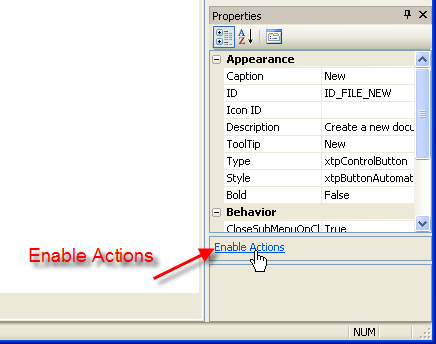
In the designer, actions must be enabled as shown in the diagram below.
This can be useful for developers who have older applications that referenced controls by name rather than by an Id.
Steps Needed to Use the Key Property:
-
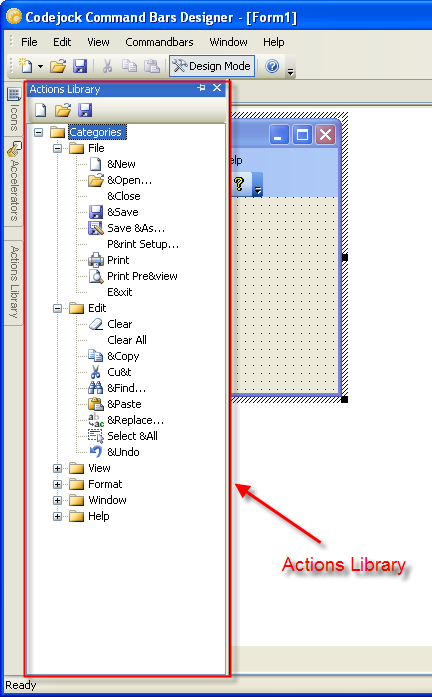
In the Designer, add all actions you need to the ActionLibrary pane and save them.
Note: The Actions Pane is a way to save and "reuse" commands. Always add controls to this library first so they can be reused in other XCB or XML files. -
Drag the actions from the ActionLibrary pane to the Controls pane, and then from the Controls pane to the Toolbars and Menus.
-
In your code, use the Key property instead of the Id.
Example
Private Sub CommandBars_Execute(ByVal Control As XtremeCommandBars.ICommandBarControl)
    If Not Control.Action Is Nothing Then
        Select Case Control.Action.Key
            Case "ID_FILE_NEW": MsgBox "New"
            Case "ID_FILE_OPEN": MsgBox "Open"
            Case "ID_FILE_SAVE": MsgBox "Save"
        End Select
    End If
End Sub
See Also
Copyright (c) 1998-2024 Codejock Technologies. All rights reserved.