CommandBarActions Collection
See Also

Command Bars ActiveX Control v24.0
Description
Collection of CommandBars Action items that have been added to the CommandBars.
For a list of all members defined in this module, see CommandBarActions members.
Object Model



Remarks
The CommandBarActions Collection allows you to add and access CommandBars Action items to your CommandBars.
CommandBar Actions eliminate the need to use the Update event to update/change the state and properties of an item that appears in multiple places in your menus and toolbars. For example, you might have a menu item that also appears in a toolbar, and a user might have created the same button and placed it in a user-created toolbar. With Actions, you can simply modify the action for the item, and it will update all occurrences of the item, no matter how many a user might have added.
Actions also work well for localization, as you can have a set of actions for each locale that can easily be used to update all occurrences of items, ensuring that all items get updated.
How it works
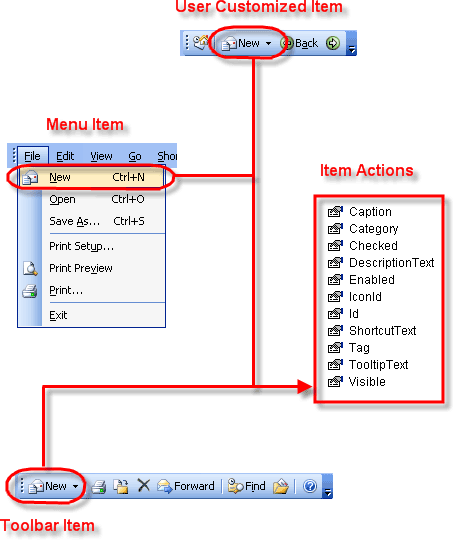
Each CommandBar item has an Id. Items with the same Id can then share a common set of properties. A CommandBars Action object, represented as "Item Actions" in the diagram below, is a set of properties that all items of a specified Id can share. When you add an Action, you will specify the Id, Caption, TooltipText, DescriptionText, and Category of the action. The Id is the Id you will assign to CommandBar items that you want to use the properties of the action. Now any CommandBar item with the same Id as an Action will use the properties of the action. When updating any property of the action, it will automatically update all occurrences of the item, regardless of how many a user might have added, whether it is in a popup menu or in a toolbar. You will no longer have to use the Update event to update/change the state and properties of an item that appears in multiple places in your menus and toolbars.
EnableActions must be called to enable actions to be used. Each CommandBar Item has an Action property, which is just a reference to the CommandBars Action item that is associated with it. If no action is added for an item or actions have not been enabled, the default properties of the item will be used.
In the diagram below, the "Menu Item," "Toolbar Item," and "User Customized Item (user created toolbar)" all share the same "Item Action." When you modify the properties of the action, it will update all occurrences of the item.
Example
Using CommandBar Actions (Visual Basic)
This sample illustrates how to use CommandBar Actions to update the properties of items that appear in multiple places in your command bars.
'Enable the use of actions
CommandBars.EnableActions

'Create Actions to be used by CommandBar items. You can create the action before
'or after the CommandBar Items are added, but if you create them before like this sample
'be sure not to overwrite any of the 5 properties of the actions when the CommandBar
'item is added.
CommandBars.Actions.Add ID_FILE_NEW, "&New", "New", "Create a new document", "File"
CommandBars.Actions.Add ID_FILE_OPEN, "&Open", "Open", "Open an existing document", "File"
CommandBars.Actions.Add ID_FILE_SAVE, "&Save", "Save", "Save the active document", "File"
CommandBars.Actions.Add ID_FILE_PRINT, "&Print", "Print", "Print the active document", "File"
CommandBars.Actions.Add ID_FILE_PRINT_SETUP, "&Print Setup", "Print Setup", "Change the printing options", "File"
CommandBars.Actions.Add ID_FILE_CLOSE, "&Close", "Close", "Close the active document", "File"

Dim Control As CommandBarControl
Dim ControlFile As CommandBarPopup

'Add some CommandBar items.
Set ControlFile = CommandBars.ActiveMenuBar.Controls.Add(xtpControlPopup, 0, "&File")
With ControlFile.CommandBar.Controls
    .Add xtpControlButton, ID_FILE_NEW, ""
    .Add xtpControlButton, ID_FILE_OPEN, ""
    .Add xtpControlButton, ID_FILE_SAVE, ""
    Set Control = .Add(xtpControlButton, ID_FILE_PRINT, "")
    Control.BeginGroup = True
    .Add xtpControlButton, ID_FILE_PRINT_SETUP, ""
    Set Control = .Add(xtpControlButton, ID_FILE_EXIT, "")
    Control.BeginGroup = True
End With

Dim ToolBar As CommandBar
Set ToolBar = CommandBars.Add("Standard", xtpBarTop)
With ToolBar.Controls
    .Add xtpControlButton, ID_FILE_NEW, ""
    .Add xtpControlButton, ID_FILE_OPEN, ""
    .Add xtpControlButton, ID_FILE_SAVE, ""
    Set Control = .Add(xtpControlButton, ID_FILE_PRINT, "")
    Control.BeginGroup = True
End With

'Disable ALL items with Id ID_FILE_SAVE
CommandBars.Actions(ID_FILE_SAVE).Enabled = False

'Change the DescriptionText of ALL items with Id ID_FILE_PRINT
CommandBars.Actions(ID_FILE_PRINT).DescriptionText = "Print the current document to a file"

'Change the ToolTipText of ALL items with Id ID_FILE_OPEN
CommandBars.Actions(ID_FILE_OPEN).ToolTipText = "Open an existing document"
See Also
Copyright (c) 1998-2024 Codejock Technologies. All rights reserved.