MarkupEnabled Property
See also: CalendarControl Control
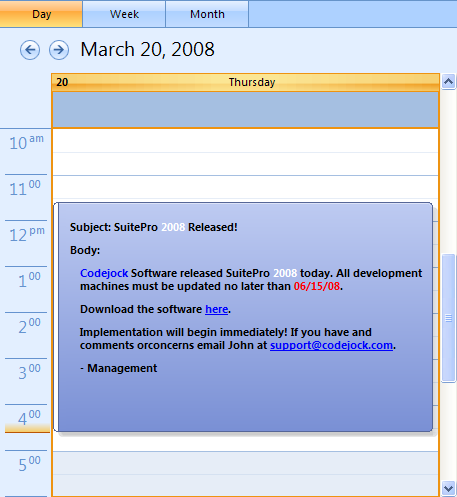
Description
Allows the use of a XAML snippet to format and display text in events/appointments.
Property type
Read-write property
Syntax (Visual Basic)
Public Property MarkupEnabled() As Boolean
Remarks
The Calendar supports using XAML to format the contents of events/appointments. Only the Office 2007 calendar theme supports XAML.
There are two usage scenarios (both require the Office 2007 theme):
- Static: XAML is stored with the event in a custom property named "xtpMarkupTemplate". When
MarkupEnabledis True, the calendar will display that XAML automatically for the event. - Dynamic: The calendar raises the
GetItemTextevent when it needs the XAML for an event. To receive this notification, enable custom text handling by setting theAskItemTextFlagsto include thextpCalendarItemText_EventMarkupTemplateflag. In this mode you supply the XAML at runtime (for example, in theGetItemTexthandler). When using thextpCalendarItemText_EventMarkupTemplateflag, the calendar will display only the XAML string you return — you do not need to set subject, location, body, etc.
To enable XAML support:
- Set the theme to Office 2007 (required for both static and dynamic use).
- Set
MarkupEnabledto True (required for both static and dynamic use). - If using dynamic XAML, set
AskItemTextFlagsto includextpCalendarItemText_EventMarkupTemplate.
Notes and recommendations:
- The best place to store XAML snippets is the custom properties of an event/appointment. This allows you to attach multiple snippets as needed.
- If you do not want to display XAML in certain views (for example, WeekView or MonthView because of space constraints), test the view in the
GetItemTexthandler and choose whether to supply XAML. - When using static XAML, ensure the custom property is named
xtpMarkupTemplateand contains the desired XAML string.
Example
The following example shows how to enable markup support and add XAML to an event/appointment. It can be used both statically and dynamically—uncomment the AskItemTextFlags line for dynamic behavior.
Private Sub Form_Load()
    ' Use Office 2007 Theme for Calendar
    CalendarControl.VisualTheme = xtpCalendarThemeResource

    ' Enable Markup
    CalendarControl.MarkupEnabled = True

    ' Enable custom text handling for event
    ' Un-comment this line for dynamic use
    ' CalendarControl.AskItemTextFlags = xtpCalendarItemText_EventMarkupTemplate

    ' Set the Calendar's View
    Dim Today As Date
    Today = Now
    CalendarControl.ViewType = xtpCalendarDayView
    CalendarControl.DayView.ShowDay DateTime.Date

    CalendarControl.DataProvider.AddEvent Add_Test_Event
    CalendarControl.Populate
    CalendarControl.DayView.ScrollToWorkDayBegin
End Sub

' Only used when text is added dynamically
Private Sub CalendarControl_GetItemText(ByVal Params As _
    XtremeCalendarControl.CalendarGetItemTextParams)

    If Params.Item = xtpCalendarItemText_EventMarkupTemplate Then
        If CalendarControl.MarkupEnabled And _
           Params.ViewEvent.Event.CustomProperties.Count Then

            ' Here you can add some custom XAML; it does not need to be stored
            ' in the properties of an event
            Params.Text = Params.ViewEvent.Event.CustomProperties.Property("xtpMarkupTemplate")
        End If
    End If
End Sub

' Function to create a sample event
Private Function Add_Test_Event() As CalendarEvent
    Dim m_pEditingEvent As CalendarEvent

    Set m_pEditingEvent = CalendarControl.DataProvider.CreateEvent

    m_pEditingEvent.StartTime = Now
    m_pEditingEvent.EndTime = Now + 0.22

    ' Properties of the event; they will be displayed when markup is not enabled.
    m_pEditingEvent.Subject = "SuitePro 2009 Released!"
    m_pEditingEvent.Location = "Internet Download (Link Included)"
    m_pEditingEvent.Body = "Codejock Software released SuitePro 2009 today. All development machines must be updated no later than 06/15/08. Implementation will begin immediately!"
    m_pEditingEvent.AllDayEvent = False
    m_pEditingEvent.Label = 2
    m_pEditingEvent.BusyStatus = xtpCalendarBusyStatusFree
    m_pEditingEvent.MeetingFlag = True
    m_pEditingEvent.ScheduleID = 1

    ' Store a XAML string to be displayed in the event body
    m_pEditingEvent.CustomProperties.Property("xtpMarkupTemplate") = _
        "<TextBlock xmlns='http://schemas.microsoft.com/winfx/2006/xaml/presentation' HorizontalAlignment='Center'>" & _
        "Subject: SuitePro 2009 Released!" & vbCrLf & _
        "Body: Codejock Software released SuitePro 2009 today. All development machines must be updated no later than 06/15/08." & vbCrLf & _
        "Download the software here." & vbCrLf & _
        "Implementation will begin immediately! If you have any comments or concerns email John at support@codejock.com." & vbCrLf & _
        "- Management" & _
        "</TextBlock>"

    Set Add_Test_Event = m_pEditingEvent
End Function
See also
Copyright (c) 1998-2024 Codejock Technologies. All rights reserved.